Salesforce and WhatsApp Integration by TimelinesAI

Your team is using multiple individual WhatsApp numbers with Salesforce? Get immediate control and 360-degree view of your business communication on WhatsApp. No WhatsApp Business API is required.

  • Automatically create Leads and Contacts in Salesforce from new WhatsApp chats
  • Sync WhatsApp Chats to Salesforce Effortlessly
  • Use existing WhatsApp numbers (private or business)
  • Start chats and continue WhatsApp conversations from Salesforce
4.5/5 on Capterra (50+ reviews)
Salesforce and WhatsApp integration for multiple numbers

Salesforce WhatsApp Integration Features

Manage WhatsApp communication directly from Salesforce with powerful sync and automation tools.

Automatic Lead & Contact Syncing

With our Outbound Webhooks you can sync new incoming leads and conversations to Salesforce in real-time. Sync up to 10,000 contacts monthly with unlimited WhatsApp accounts.

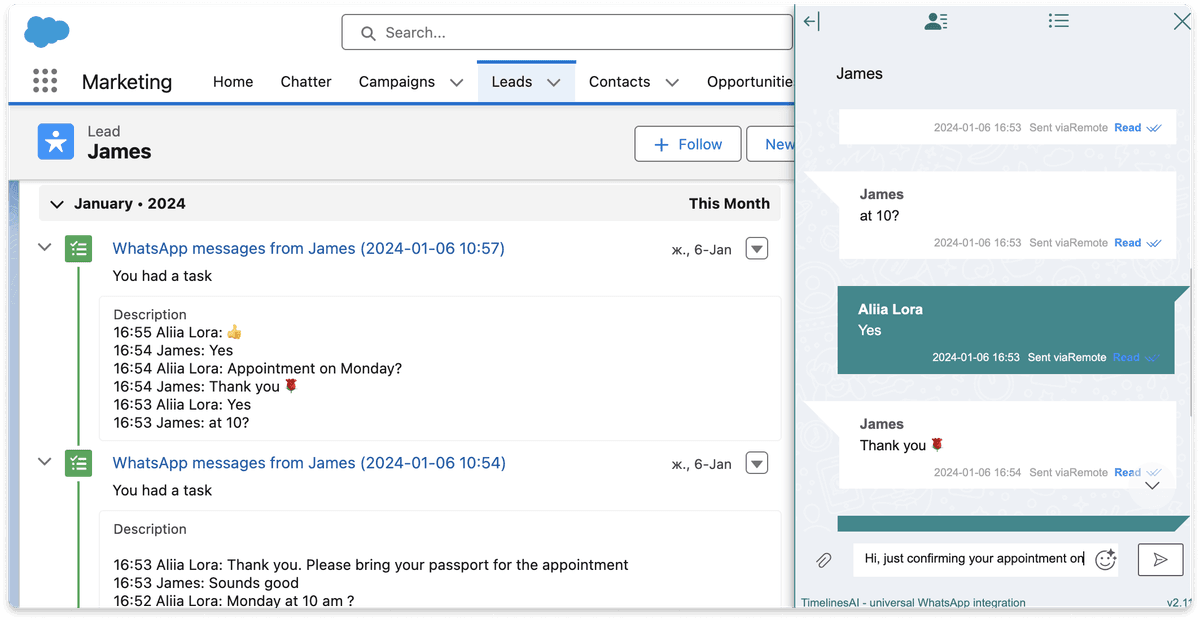
WhatsApp Chat Sync to Salesforce

Preview conversations within the Leads Activity section, automate chat synchronization, and manage all your WhatsApp communications directly from Salesforce.

Automated Personalized Messaging

Our native WhatsApp and Zapier integration allows you to use any field from Salesforce to build personalized messages. Send messages based on any trigger in Salesforce.

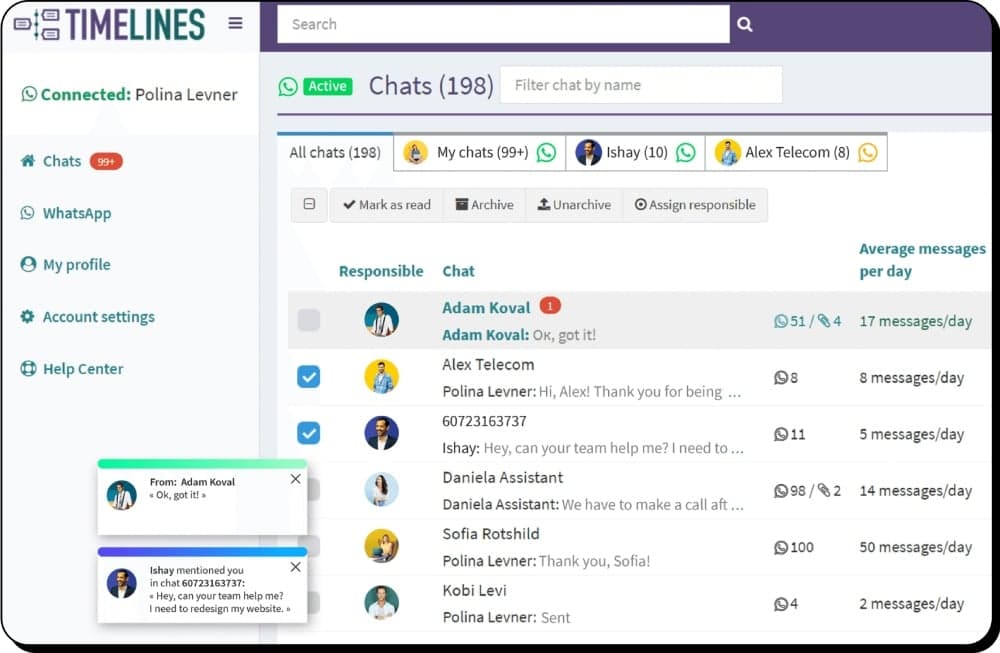
Multi-Number Shared Inbox

Bring visibility and control of your WhatsApp Business communication to a new level. All chats from multiple unlimited WhatsApp numbers in one place updated in real-time.

500+ Brands Across 34 Countries Use TimelinesAI

Very helpful and looking forward to more updates

TimelinesAI has been very helpful for our team's WhatsApp communication management with Salesforce. Looking forward to see more updates and features.

Bucky Jones

Capterra · 2024

Great product for early-stage startups

TimelinesAI is flexible, unlike a lot of other WhatsApp business solutions out there. WhatsApp is our only support channel. It helps us manage customer interactions on WhatsApp seamlessly at a very reasonable cost.

Sheila Herman

Capterra · 2024

Highly customisable and friendly

We work in the hotel business, so keeping in touch with people travelling is very easy using WhatsApp. It allows us to have multiple people answering guests and automate basic replies such as the address.

Ken Collier

Capterra · 2024

How to Connect WhatsApp to Salesforce

Get started in 4 simple steps — no WhatsApp Business API required.

1

Sign Up for Free Trial

Create your TimelinesAI account. The 10-day trial is fully functional with no credit card required.

2

Connect WhatsApp

Scan the QR code with your WhatsApp app. Works with both personal and business accounts.

3

Connect Salesforce

Authorize TimelinesAI to connect to your Salesforce account. Setup completes in under 5 minutes.

4

Start Syncing

Messages automatically sync to Salesforce Leads and Contacts. Configure webhook automations as needed.

Frequently Asked Questions

Yes, TimelinesAI Salesforce and WhatsApp integration works with any type of WhatsApp accounts.
TimelinesAI offers a comprehensive solution allowing businesses to integrate multiple individual WhatsApp numbers with Salesforce, providing immediate control and a 360-degree view of business communication on WhatsApp.
No, TimelinesAI's solution does not require the WhatsApp Business API. You can seamlessly integrate multiple WhatsApp numbers with Salesforce without the need for additional APIs.
Yes, once you establish the integration between WhatsApp and Salesforce, you can automatically create Leads, Contacts, and Deals in Salesforce from new WhatsApp chats. This ensures real-time synchronization.
TimelinesAI allows effortless syncing of WhatsApp chats to Salesforce. You can preview conversations within the Leads Activity section, automate chat synchronization, and manage all WhatsApp communications directly from Salesforce.
Yes. Invite your team members into the TimelinesAI app, and ask them to connect their WhatsApp numbers by scanning the system-generated QR code on the WhatsApp tab.
The pricing starts at $40/mo per WhatsApp number connected. Annual discounts apply.
Yes, TimelinesAI supports any kind of attachment from WhatsApp.
Yes, you can upload the custom CSV list to send mass messaging campaigns on WhatsApp to your contacts.
TimelinesAI's native WhatsApp and Zapier integration allows you to send automated personalized messages from Salesforce. You can use pre-made templates or request custom ones, and the Inbound Webhooks option provides flexibility.
Integrations

Explore More WhatsApp Integrations

Discover More with TimelinesAI

Start your 10-day free trial today. No credit card required. Harness the power of WhatsApp for your Salesforce CRM.
TimelinesAI WhatsApp shared inbox for teams