
- Overview
- The three barriers
- Honesty
- Verdict

Sales Lead, TimelinesAI·August 13, 2026·4 min read
Overview
What's actually at risk on a personal number setup?
The same thing every time: a rep connects their personal WhatsApp, and the first thing that crosses their mind isn't "great, now my deals sync automatically" — it's "wait, does this mean someone can see my mom's messages?" That single moment of doubt is the biggest reason seats on a personal-number rollout go quiet. The three mechanisms below exist because that fear is specific and answerable, even though the number itself is still the rep's own.
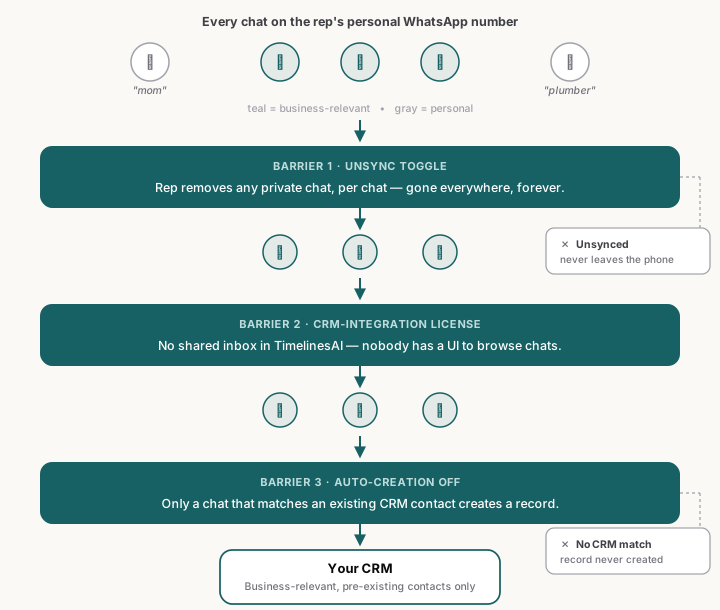
The three barriers
Barrier 1 — Reps can unsync private chats
When a number connects, TimelinesAI pulls its contacts and chats — and every rep can unsync any individual chat with a toggle, themselves, without asking anyone. Once a chat is unsynced, we stop looking at it, and it disappears from everywhere in TimelinesAI, permanently. This is the one barrier the rep controls directly rather than the admin, which matters: it doesn't depend on the company configuring anything correctly, it depends on the rep clicking one toggle on the one chat they care about. (How to disable private chat syncing →)
Barrier 2 — The CRM-integration license removes the UI entirely
This one isn't a filter, it's a structural fact: on the CRM-integration license, nobody has access to any chat inside the TimelinesAI UI at all — there's no shared inbox to open, no chat list to scroll through, no screen where a manager could browse a rep's conversations even if they wanted to. TimelinesAI is middleware between WhatsApp and the CRM on this license, nothing more. It's a different guarantee from barrier 1: barrier 1 keeps a specific chat from ever being looked at anywhere; barrier 2 means there's no "anywhere" to look in the first place, for any chat, business or personal.
To switch to it, contact us — it's a plan change, not a settings toggle.
Barrier 3 — Disable auto-creation in your CRM integration settings
With auto-creation turned off, a conversation never creates a new lead or contact in your CRM on its own — TimelinesAI only syncs a chat to a contact that already exists there. Your rep's aunt isn't in your CRM. Neither is their kid's soccer coach. With nothing to match against, there's nothing for those chats to sync to, and no record ever gets created for them — regardless of whether the rep remembered to unsync anything. This is the barrier that catches what barrier 1 misses: the chat the rep didn't think to unsync, because it never occurred to them it might show up anywhere.
Honesty
Does this solve the "role without chat access" problem?
No, and I want to be straight about that rather than let this piece quietly overclaim. The role-without-chat-access feature nobody has shipped is about a different, harder problem: once a business conversation is in the system, can a manager see performance metrics — volume, response time, deal linkage — without being able to read the message content? That's still an open gap, for us and for the category, and nothing here changes that.
What the three barriers above do is narrower and upstream of that problem: they control what data ever enters the system at all. A chat that's unsynced, or never had a UI to be seen through, or never matched a CRM contact, never becomes a data point anyone — manager or otherwise — could see the content of. But any business conversation that does clear all three barriers and lands in your CRM is then fully visible to anyone with inbox access, exactly as described in that piece. Data minimization and access control are two different layers. These three barriers are strong on the first one. The second one is still unsolved.
Verdict
What this means for your setup
If you're running personal numbers and a rep raises the "will my manager see my mom" objection — and on any team past a handful of reps, someone will — walk them through these three specifically, in this order: they can unsync anything themselves right now, the CRM-integration license removes the viewing surface entirely if you need that guarantee company-wide, and auto-creation being off means an unmatched chat never becomes a record regardless. None of the three require moving off their personal number. What they don't do is give a manager a content-free performance view of the conversations that do stay in the system — for that gap, and the honest reason nobody's shipped it yet, read The role-without-chat-access feature nobody has shipped next.
Cluster hub: /perspectives/topic/personal-numbers-privacy-waba/.
More perspectives
The role-without-chat-access feature nobody has shipped — and why your reps won't connect
Across every WhatsApp-CRM tool, including ours, no vendor has shipped manager visibility without chat-content access. A meaningful share of seats stay silently unconnected.
Cyril Zakirov
Personal vs company numbers — pick company numbers, then sync
Personal numbers give you reps you cannot onboard, audit, or offboard. Six reasons to issue company numbers — WhatsApp Business on a virtual SIM — and sync those.
Cyril Zakirov