
- Overview
- Honesty
- Verdict

Sales Lead, TimelinesAI·August 13, 2026·4 min read
Overview
Isn't the WhatsApp Business app just the WhatsApp Business API?
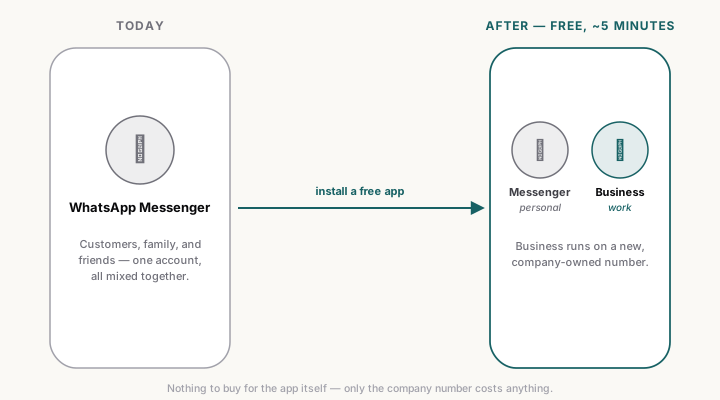
No — and mixing the two up is where most of the hesitation comes from. The WhatsApp Business app is free and works exactly like the WhatsApp Messenger your customers already have: same interface, same phone, a few extra business features like a profile and quick replies. The WhatsApp Business API (WABA) is a separate, paid product for templated broadcast messaging at scale, with Meta approval and per-conversation pricing — a different tool for a different job. Nothing below needs WABA, an approval process, or a contract. (For the full case on personal-style numbers vs. WABA specifically, see Personal numbers vs WhatsApp Business API.)
What do the 7 reasons add up to?
| Reason | The short version |
|---|---|
| No devices to buy | Messenger and Business run side by side on the same phone |
| Company keeps the relationship | Chats and history stay with the company when a rep leaves, not their personal phone |
| Clean work/life separation | Work pings in one app, family chats in another — nobody hands out a personal number |
| Looks professional | A business profile shows your name, logo, and hours, not a stranger's number |
| Compliance stops being a blind spot | Customer chats on a company number can be accessed, audited, and deleted on request |
| Upgrade path stays open | Only a company-owned number can migrate to the WhatsApp Business API later, if you ever need it |
| Works better with a CRM sync | TimelinesAI (and similar tools) need a number the company controls to sync it anywhere |
None of these depend on each other — acting on just one already puts you ahead. But they compound: the number that costs nothing to provision is also the one that stays with the company when a rep leaves, and the one that can move to WABA later if the day comes.
Honesty
What's the one thing this doesn't fix?
Visibility. WhatsApp Business is a per-rep tool: each rep sees their own chats, and nobody else sees anything. No shared inbox, no chat history landing in your CRM, no manager visibility, no reps stop copy-pasting deal updates by hand into a spreadsheet. Switching to a company-owned number and the free app fixes ownership, compliance, and continuity — it does not, on its own, give anyone a view across the team. That's a different layer, and it's the reason a CRM integration on top of the number matters as much as the number switch itself.
Verdict
What this means for your setup
Do this one this week: order a number per rep, install WhatsApp Business, and move customer conversations off personal accounts. It's free, takes an afternoon for a small team, and fixes ownership, compliance, and continuity in one move — see how to actually source a number that passes WhatsApp verification if you haven't done this before. For the full case with the offboarding math and the privacy tradeoffs spelled out, read Personal vs company numbers — pick company numbers, then sync next. And if some of your team is going to stay on personal numbers regardless, here's what actually keeps their private chats private when you sync them. Once the numbers are sorted, plugging them into a CRM is what turns "reps have WhatsApp" into a pipeline you can see.
Cluster hub: /perspectives/topic/personal-numbers-privacy-waba/.
More perspectives
Personal vs company numbers — pick company numbers, then sync
Personal numbers give you reps you cannot onboard, audit, or offboard. Six reasons to issue company numbers — WhatsApp Business on a virtual SIM — and sync those.
Cyril Zakirov
Personal numbers vs WhatsApp Business API — pick personal if you sell
Sales is 1-to-1 conversation. Templates, 24-hour windows, and per-message pricing make WABA the wrong tool for reps. Use WABA only for marketing and service.
Cyril Zakirov
TimelinesAI on personal numbers — three barriers between your rep's chats and your CRM
We recommend company-owned numbers, but if your team runs WhatsApp Messenger on reps' private numbers anyway, three specific mechanisms keep family and friend chats out of your CRM entirely — without switching numbers.
Cyril Zakirov