Meta has brought an AI-powered chatbot right to your WhatsApp!
There’s something new coming up in the world of artificial intelligence (AI) every day, and Meta, the parent company of WhatsApp, has announced a new feature. They have launched a cool and exciting feature that lets you chat with an AI called Meta AI directly within your WhatsApp chats. This chatbot is powered by Meta’s advanced large language model, LLaMA 3.
But what exactly is this chatbot, and how can it help you out? This blog will answer all your questions, so keep reading!
What is the Meta AI in WhatsApp?
Meta AI is an optional AI-powered chat experience available in limited versions of WhatsApp. Developed by Meta, it uses generative AI technology to be a helpful and informative conversational partner.
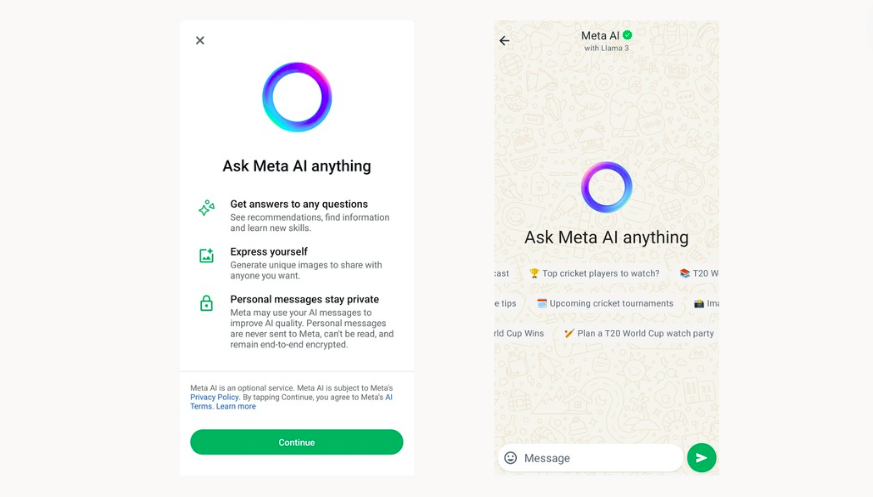
Meta AI in WhatsApp is free to use. This in-app integration could finally help familiarise many users with the potential of Generative AI, making it more accessible and interactive than ever before. Here’s a breakdown of what it can do:
Answer your questions: Got a question? Meta AI can try its best to answer it, using its vast knowledge base and understanding of your conversation.
Offer recommendations: Stuck on ideas for a group dinner or activity? Meta AI can offer personalized recommendations based on your preferences and interests.
Image generation: Want to see your ideas come to life? WhatsApp AI assistant’s image generation feature tests the creativity of your prompts. Craft a detailed description of an image you envision, and the assistant will use its deep learning capabilities to generate a unique image. For superior image quality and control, incorporate Recraft v3 to bring your ideas to life. Imagine anything you can dream up, from a majestic underwater city to a portrait of your pet as an astronaut.
Chatting with Meta AI: Meta AI is designed to be conversational and engaging. Whether you want to chat about your latest hobby, discuss current events, or simply explore interesting topics, Meta AI can keep the conversation flowing.
Meta AI Chatbot Availablity
Meta AI is still under development and is currently in a limited rollout phase. This means they’re slowly introducing the feature to users in select countries around the world. This way, they can collect feedback and fine-tune its functionalities. There’s no confirmed date yet for a wider release.
Also, currently, Meta AI can only understand and respond to questions in English.
With the basic availability information out of the way, it’s time to learn how to use Meta AI.
How to Use Meta AI on WhatsApp?
If you are one of the lucky ones who has received the update and can use Meta AI on your WhatsApp, here’s a short guide to help you understand how it works.
How to Start a Conversation?

First things first, make sure you have the latest version of WhatsApp. Then start with the following steps:
- Open your WhatsApp app and head to the chat screen.
- Here, you will find a round purple-blue circle. Click on it. This will open a chat with Meta AI. You can also click the “New Chat” button and select “Meta AI.”
- If this is your first time, Meta AI might ask you to read and agree to the terms of service. Give it a quick read and tap “Accept” if you’re happy with it.
- Type your question or request for Meta AI in the chat bar.
- Once your message is ready, tap the send icon (the arrow pointing right). Meta AI will analyze your question and respond directly to it within the chat.
How to Start a Conversation with Meta AI in Your Group Chats?
Meta AI brings the power of AI to your WhatsApp group chats! This feature allows you to ask questions and get information without ever leaving the conversation. Here’s how to get started:
- Open the specific group chat where you’d like to use Meta AI.
- Within the message typing field, begin by typing the “@” symbol. As you type, a list of options will appear. Look for “Meta AI” and select it from the list.
- Clearly formulate your question or request in the message bar.
- Once you’ve crafted your message, tap the send button.
- Meta AI will analyze your message and deliver its response directly within the group chat window, and this reply will be visible to everyone in the conversation.
Note: In group chats, Meta AI can only respond to messages that specifically mention it using “@Meta AI.” It cannot access any other chats in the group.
How to Generate Images with Meta AI on WhatsApp?

Meta AI uses its image recognition and text-to-picture technologies to generate images. When you describe what you want in an image, Meta AI uses its knowledge from the training data to generate the image. Let’s understand how you can use this feature.
There are two ways to get started:
1. Chatting with Meta AI directly: If you’re already in a conversation with Meta AI, simply type /imagine and enter the description of what you want the image to look like.
2. Using Meta AI in another chat: If you’re in a different chat and want Meta AI to generate an image, type /imagine after mentioning Meta AI. Here’s how to do that:
- Type the symbol “@” in the message field.
- Choose “Meta AI” from the list that pops up.
- Now, type /imagine and then enter your prompt/description.
Once you’ve finished describing your image, hit send. Meta AI will take a moment to work its magic and then generate an image based on your description.
If the first image isn’t quite what you envisioned, don’t worry. You can reply to the message with Meta AI containing a new description to update the image. It will use your new prompt to adjust the image based on your feedback.
Also, you’ll see an image appear as you start typing your prompt — and it’ll change with every few letters typed, so you can watch as Meta AI brings your vision to life. (This feature might not be available in your region yet.)
But what if you decide Meta AI isn’t for you? Here’s what you need to know about removing it.
How to Remove Meta AI in WhatsApp?
As of July 2024, there’s no way to completely remove Meta AI from WhatsApp. However, there are a couple of things you can do:
Hide the Button (if available): In some versions of WhatsApp, there might be a “Show Meta AI Button” option within the Settings. If you find this setting, you can toggle it off to hide the button.
Avoid the Trigger: Remember, Meta AI only springs into action when it sees “@Meta AI” mentioned in a chat. So, you can simply avoid using that phrase. If you don’t mention it, Meta AI won’t jump into the chat.
Whether you decide to keep using it or not, there are some important things to consider regarding privacy and data.
Notes and Privacy Considerations
Here are some key things to remember when using Meta AI:
Privacy and Data
When using Meta AI, keep in mind that your interactions are subject to Meta’s Privacy Policy and AI Terms of Service.
Accuracy Check
It’s important to remember that while Meta AI strives for accuracy, AI-generated messages may sometimes be incorrect or inappropriate. It’s a good practice to double-check important information, especially from reliable sources.
End-to-End Encryption Remains
Meta AI can only read what is sent to them. Your personal messages and calls remain end-to-end encrypted.
Data Usage for Improvement
The information you send through Meta AI’s generative features, like creating images, may be used to improve the AI model or provide you with better responses. However, the AI is designed to minimize the possibility of personal details, like names, appearing in other chats.
Deleting Your AI Chats
If you want to clear your history with Meta AI, you can simply type /reset-all-ais in a conversation. This will delete all your past interactions with the AI assistant.
Conclusion
Meta AI on WhatsApp brings an innovative and interactive AI-powered experience right to your WhatsApp. This tool can answer your questions, recommend activities, and even create images based on your descriptions.
Using the advanced large language model, LLaMA 3, it delivers a more engaging and highly personalized interaction. Whether you’re looking for answers, brainstorming ideas, or just want to explore the creative potential of AI-generated images, Meta AI is there to lend a hand.
As you explore the capabilities of Meta AI, remember to utilize it responsibly and be mindful of privacy considerations. To know more about the use of AI on WhatsApp, you can check out this blog.
Frequently Asked Questions: Meta AI FAQs
Q. How do I get Meta AI on WhatsApp?
A. To access Meta AI on WhatsApp, ensure you have the latest version of the app installed. Meta AI is currently in a limited rollout phase, so availability may vary. If it’s available in your region, you will see a purple-blue circle icon or a new option to start chatting using Meta AI within your app.
Q. Why is my WhatsApp showing Meta AI?
A. Your WhatsApp is showing Meta AI because you are part of the limited rollout phase, during which Meta is introducing this new feature to select users. This allows Meta to collect feedback and improve the functionality before a wider release.
Q. Is WhatsApp Meta AI safe?
A. Meta AI is designed to operate within Meta’s Privacy Policy and AI Terms of Service. You have control over your data – you can delete individual AI chats. Also, personal chats are end-to-end encrypted.
Q. Which countries is WhatsApp Meta AI available in?
A. Meta is gradually introducing Meta AI to users worldwide. Currently, it is available in many countries, including India, Australia, the United States, Canada, Jamaica, New Zealand, Nigeria, Ghana, Singapore, South Africa, Brazil, and Zambia.
Q. Is Meta AI available in India?
A. Yes, Meta announced the availability of its AI assistant, ‘Meta AI,’ in India in June 2024.
Q. What can Meta AI do on WhatsApp?
A. Meta AI can assist with various tasks such as answering questions, providing information, setting reminders, translating text, and more. Its capabilities are continuously being updated and improved based on user feedback and advancements in AI technology.
Q. Is Meta AI on WhatsApp free?
A. Absolutely! Using Meta AI on WhatsApp is completely free.