

WhatsApp has become an essential communication platform for nearly 3 billion users across the world. People use WhatsApp for more than just chatting. From video calls to making payments, WhatsApp is becoming the go-to app for everything.
However, with great power comes great responsibility, and that is- keeping your chats safe. With the rapid growth in technology, data safety and security have become a major concern. WhatsApp understands this and constantly develops new features to ensure your chats remain secure. From end-to-end encryption to two-factor authentication, it offers several security features.
Whether you’re an individual seeking to protect your privacy or a business owner aiming to secure your professional communications, this guide has you covered. In this blog, we will discuss the different WhatsApp security features in detail and how you can protect your chats from fraudsters and prying eyes.
What is WhatsApp Security?
WhatsApp security is all about ensuring your private messages remain private. This is achieved through various features, including end-to-end encryption, two-factor authentication, and biometric authentication.
Why is Messaging App Security Important?
It could be a message where you lay your soul bare for a loved one. It could be a chat that includes confidential financial documents. Whatever the chat is about, it is very important that the walls of these platforms are strongly fortified so that people can use them with peace of mind. Here’s why security is crucial:
Protecting Sensitive Information: We often share sensitive data like passwords, financial information, or personal details on messaging apps. Strong security makes sure this information stays between you and the intended recipient.
Combatting Fraud and Scams: These days, in the blink of an eye, you hear about some new scam. Messaging apps are a breeding ground for phishing scams and fraud attempts. WhatsApp’s security features can spot these red flags and keep your money safe.
Maintaining Privacy: We all have a right to privacy in our communications. With security measures guarding your messages, you can have private conversations without fear of eavesdropping.
Building Trust: Knowing that the messages are encrypted and private will help build trust and let you use the app more confidently.
TL;DR: Strong messaging app security keeps your private messages private, protects you from scams, and ensures your sensitive information stays safe.
Now, let’s start talking about the different security features offered by WhatsApp. First, end-to-end encryption.
End-to-End Encryption: Securing Your WhatsApp Messages
End-to-end encryption (E2EE) is the main hero when it comes to WhatsApp security. This fancy term means that your messages are scrambled into a secret code only you and the recipient can crack.
Imagine you write your message in invisible ink. E2EE is like a special lamp that reveals your hidden message to the intended recipient. For everyone else, the paper remains blank.
How Does End-to-End Encryption Work?

- Locking the message: When you send a message, it changes into some unreadable format using a unique key. This key is like a secure lock on your message.
- Distributing the key: Here’s the cool part—E2EE doesn’t store this key on WhatsApp’s servers. Instead, your phone and your friend’s phone create their own unique, temporary codes for that chat.
- Sending the encrypted message: The encrypted message, which is essentially gibberish without the key, is then sent over the Internet. The key is delivered securely using a process called a “key exchange.”
- Unlocking on the other side: Once it reaches your friend’s phone, their special code unlocks the message, revealing your original message loud and clear!
Benefits of End-to-End Encryption
1. Enhanced Privacy: E2EE protects your messages from prying eyes. Not even WhatsApp can access them.
2. Increased Security: Since the codes are temporary and never stored anywhere, it’s much harder for hackers to steal them and read your messages.
Limitations of End-to-End Encryption
1. Backups Not Encrypted: By default, chats you back up to your phone or cloud storage aren’t encrypted. If someone gets access to your backups, they could potentially be able to read your messages.
2. Law Enforcement Challenges: E2EE can make things tricky for law enforcement investigating crimes. Since messages are encrypted and keys are temporary, accessing content for investigations can be difficult.
E2EE: Encryption for All Message Types
The good news is that E2EE is not just for text messages. It applies to all forms of communication within WhatsApp:
Multimedia Sharing: Whether you’re sending photos, videos, or documents, E2EE ensures they are encrypted from the moment you send them until they reach the recipient’s device.
Group Chats: Even in a lively group conversation, your messages stay hidden from prying eyes. Each group gets its own secret code, like a VIP pass, ensuring only members can see what’s being said.
Voice and Video Calls: Your voice and video calls are also shielded by E2EE. The call data is encrypted on your device and can only be decrypted by the recipient’s device.
Whether you’re sending silly memes or having a top-secret chat, E2EE does its job so that your messages are shielded from outsiders.
WhatsApp Two-Step Verification: Adding an Extra Layer of Security
Two-step verification (2FA), or two-factor authentication, adds an extra layer of protection by asking you to enter a six-digit PIN to access your account.
Simply knowing your phone number is not enough. As the name suggests, it double-checks your identity. So, if someone tries to log in, they will immediately face a hurdle here as they will not be aware of this secret PIN.
How Does Two-Step Verification Work on WhatsApp?

Here’s how this fancy feature works:
Enabling 2FA: You can activate 2FA in your WhatsApp’s settings. WhatsApp will ask you to create a six-digit PIN that you must enter whenever you register your WhatsApp account on a new device. Remember, no birthdates, please. Or worse, 123456!
Adding an Optional Email: You can go ahead and link your WhatsApp account to your email address. If you forget your PIN, WhatsApp can send you a reset link via email.
Regular PIN Requests: WhatsApp asks you to re-enter your PIN from time to time just to jog your memory.
How to Enable 2FA on WhatsApp?
- Open WhatsApp and go to the Settings menu.
- Tap on “Account” and choose “Two-step verification.”
- Click “Enable” and set your six-digit PIN.
- You can also add an email address for PIN recovery so that you have a backup option in case you forget your PIN.

Benefits of Two-Step Verification
Enhanced Security: Even if someone gets access to your phone and SMS OTPs, they will need the 6-digit PIN to enter your WhatsApp.
Control Over Account Recovery: WhatsApp asks you to enter your email address. This way, if you forget your PIN, you can easily reset it. You remain in control of your account recovery process, even if you lose access to your phone.
Limitations of Two-Step Verification
Potential for Lockout: If you do not link your e-mail address, recovering your account can be difficult. Also, WhatsApp may ask you to wait for a long time before giving you access again.
Inconvenience: Entering your PIN every time you log in to a new phone might seem like a bit of a hassle. However, the security benefits outweigh this minor annoyance.
2FA ensures that your WhatsApp account is doubly protected against unauthorized access.
Also Read: How to Check if You’ve Been Hacked & What to Do?
Biometric Authentication: Unlocking WhatsApp with a Touch

Biometric authentication refers to securing your chats with a layer of convenience and security that’s uniquely you. You will be allowed to access the app only if WhatsApp recognizes your fingerprint or facial pattern.
How Does Biometric Authentication Work on WhatsApp?
Biometric authentication is like an additional layer of security on top of your screen lock. Here’s the process:
- Supported Devices: First things first, this feature only works on smartphones with fingerprint scanners or facial recognition technology.
- Enabling Biometric Unlock: Go to your WhatsApp Settings > Privacy > App Lock. There, you’ll find an option for “Unlock with biometric” (depending on your device). Follow the screen prompts and train your fingerprint scanner or facial recognition system to identify you.
- Unlocking WhatsApp: Now, whenever you open WhatsApp, you will be prompted to use your fingerprint or scan your face to unlock your chats.

Benefits of Biometric Authentication
Uniquely You: Unlike passwords that can be stolen or guessed, your fingerprint or face is unique. This makes it difficult for snoopers to snoop and fraudsters to fraud.
Improved Convenience: If you enable biometric authentication, you do not have to remember a separate PIN or password for WhatsApp. A simple touch or glance will do the job. Yes, we already have too many passwords to remember these days!
Limitations of Biometric Authentication
Device Dependency: Biometric authentication only works if your phone has a fingerprint scanner or supports facial recognition technology. Otherwise, you are welcome to use the other security features.
Potential Errors: Sometimes, fingerprint scanners or facial recognition systems might not work perfectly and fail to identify your biometrics. Or they might need a second look to recognize you.
Remember, it’s always a good idea to use a strong screen lock in addition to biometric authentication for WhatsApp. This combination helps keep your chats and other information safe and secure.
Monitoring and Managing Linked Devices
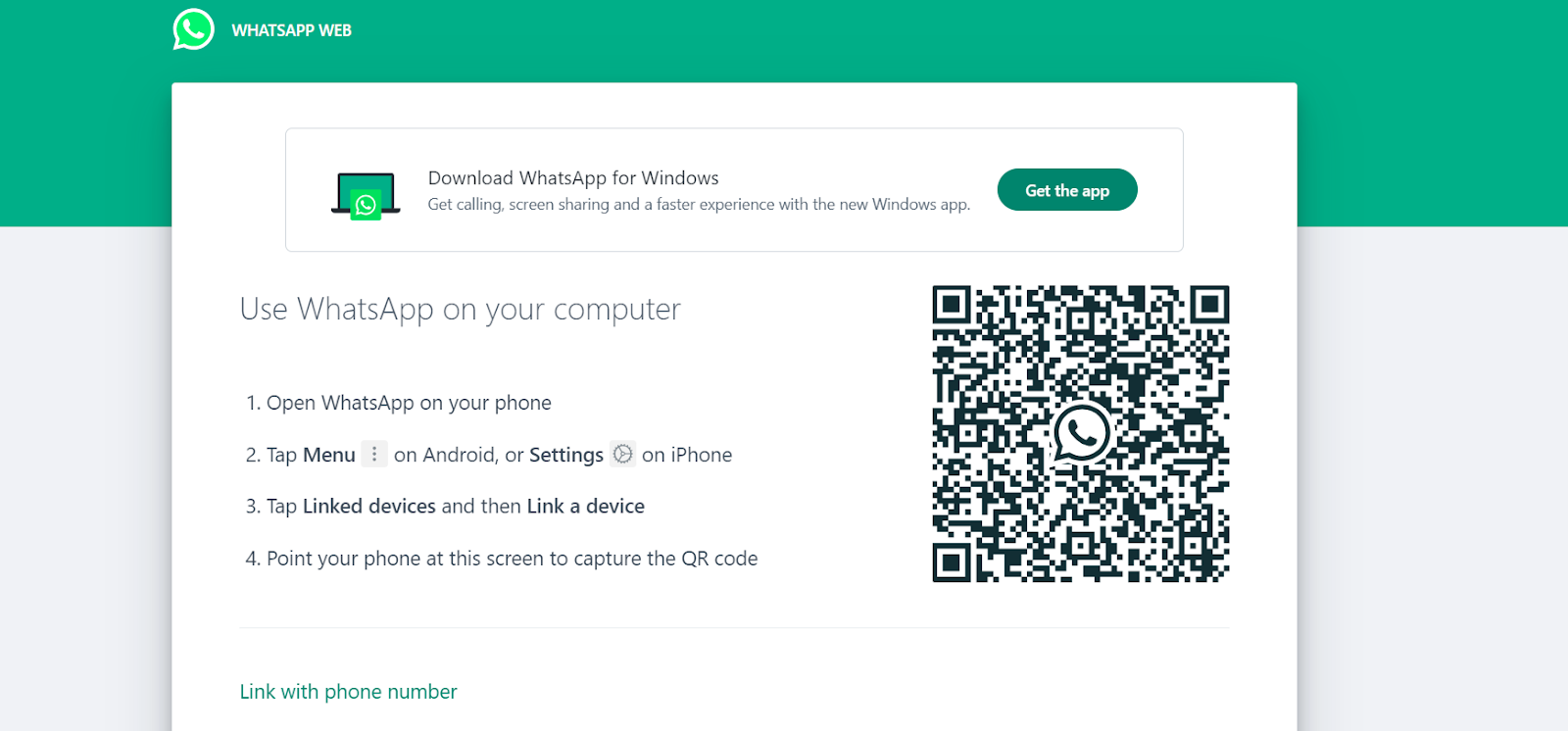
With WhatsApp’s multi-device functionality, you can use your account on multiple devices so that you stay connected on the go. However, with great convenience comes some responsibility! While helpful, unauthorized linked devices can be a security risk. Here’s how to monitor and manage them to keep your WhatsApp secure:
- Regularly review the “Linked Devices” section in your WhatsApp settings (More > Linked devices). This will show a list of all currently linked devices with details like device name, last used time, and operating system.
- If you find an unknown device, tap on it and select “Log out” to unlink it immediately.
- Be cautious when you are linking devices. Only link those you trust and will use regularly.
- Don’t link on public or shared computers.
WhatsApp Privacy Settings for User Control
WhatsApp offers several privacy settings that can help you control your online experience. Here are some of the major ones:
Last Seen and Online Status: You can choose who can see when you were last active or if you’re currently online. Options include Everyone, My Contacts, My Contacts Except…, or Nobody.
Profile Photo and About: Choose who can see your profile picture and the About section in your bio.
Read Receipts: If you do not want people to know that you have read their messages, you can turn off the read receipts (blue tick). (Remember, this is a two-way street – you won’t see if others have read yours either.)
To adjust these settings, open WhatsApp and go to Settings > Account > Privacy. Here, you can choose the options that work best for you.
Blocking and Reporting Unwanted Contacts and Messages
Is someone bothering you on WhatsApp? Are you tired of pesky messages or unwanted calls disrupting your online experience? You can easily block or report these contacts. Here’s how this feature helps you:
Blocking Bullies and Trolls: If someone is sending you harassing or abusive messages, you can block them. This stops them from texting you again and maintains your mental well-being.
Spam Control: Nobody likes to wake up to spam accounts that send unsolicited promotional messages or links. You can block these accounts and keep your inbox clutter-free. This also protects you from potential phishing scams.
Report Inappropriate Content: If you think someone is crossing a line on WhatsApp, you can go a step further and report their account. Reporting notifies WhatsApp to identify and potentially take action against these users.
How to Block Someone on WhatsApp?
- Open the chat that you want to block and tap the three dots in the top right corner.
- Select “More” and then “Block.” Confirm by tapping “Block” again.
- WhatsApp will also ask if you want to report the contact. If you choose to report, this will send the last five messages to WhatsApp for review.

There’s another way to block a contact. Open the chat and click on the contact’s name at the top. Scroll down and select “Block Contact.” Confirm by tapping “Block.”
How to Report Someone on WhatsApp?
- Open the chat with the person you want to report and tap the three dots again.
- Select “More” and then choose “Report.” Confirm by tapping “Report” again.
- When you report someone, WhatsApp will also ask if you want to block the contact and delete the chat. Confirm your choice to proceed.

Similar to blocking, you can tap the contact’s name at the top, scroll down, and select “Report Contact” to report someone.
Remember, taking charge of your online privacy is an important step towards a healthy digital life.
Also Read: What Happens When You Report & Block Someone On WhatsApp?
Disappearing Messages, Chat Lock, and View Once Feature
Three other features offered by WhatsApp to provide you with a top-notch experience are- Disappearing Messages, Chat Lock, and View Once. Here’s how they can help:
Disappearing Messages: Here for a Good Time, Not For a Long Time
Enhanced Privacy: Disappearing messages vanish after a set time (24 hours, seven days, or 90 days) after being opened. This way, a message does not stay in the chat history if you don’t want it to.

Encourage Candid Conversations: Feeling free to share openly can be refreshing. People know that these conversations will disappear, so they can choose to be more candid.
Manage Storage: Automatically deleting old messages can manage data storage and your device. This also reduces potential risks during data breaches.
Reduced Clutter: If you hate clutter even in your chats, disappearing messages can keep your chat history clean. No more scrolling through endless messages to find what you need.
Remember: Screenshots and recordings can still capture disappearing messages before they vanish!
Chat Lock: An Extra Layer of Security
Added Security Layer: Chats that are locked using Chat Lock open with a PIN, pattern, or biometric authentication (like fingerprint or facial recognition). This extra layer of security goes beyond the app’s main access controls.
Protection for Sensitive Chats: For chats containing sensitive personal or business information, chat lock provides an extra layer of security so those messages can remain hidden from prying eyes.
Stress Reduction: Using Chat Lock can reduce your worry about someone accidentally or intentionally reading your private messages.
View Once Media: Adding an Ephemeral Touch to WhatsApp

WhatsApp lets you send photos and videos that self-destruct once they are opened. Here’s how this feature can help:
Enhanced Discretion: Do you need to share something temporary, like a one-time password or confidential document? The View Once feature will self-destruct your message after a single viewing by the recipient.
More Control: You have more control over how long your media sticks around. You no longer have to worry about your messages being saved or forwarded.
Remember: No security feature is foolproof, so be mindful of what you share.
WhatsApp Security: Avoiding Phishing Attempts
Phishing is an online scam where internet thieves “fish” for your confidential financial information and steal your hard-earned money. Here’s how to recognize and avoid them:
Red Flags of a Phishing Scam
Unknown Numbers and Pressure Tactics: Always be wary of messages you get from unknown numbers, especially those calling for immediate action. These messages create a sense of urgency so that you do not consult others before falling into the trap.
Suspicious Links or Attachments: Avoid clicking links or downloading attachments from unknown numbers. These links can contain malware or lead to fake websites that steal your information.
Requests for Personal Information: No legitimate company will ask for your private information, such as passwords, credit card details, or verification codes, through WhatsApp. If someone asks you for all this, it should immediately raise warning bells.
Offers That Are Too Good to Be True: Be sceptical of messages offering free prizes, money, or exclusive deals. These are often scams.

How to Stay Safe?
- Never share your passwords, bank details, or verification codes through WhatsApp.
- Enable Two-Step Verification to add an extra layer of security to your WhatsApp account.
- If you’re unsure about a link, don’t click on it. Hover over the link on the desktop or tap and hold it on mobile to preview the URL before you visit it.
- If you think the message is trouble, go for the plain old Report and Block.
Remember, if something seems suspicious, it probably is. It’s always better to err on the side of caution.
Secure Usage of WhatsApp on Public Networks
Public Wi-Fi is a lifesaver. It is free, and it lets you stay connected on the go. However, they also come with security threats.
Understanding the Risks of Public Wi-Fi
Public Wi-Fi networks are often unencrypted, meaning your data travels in plain sight. Here’s what can go wrong:
Man-in-the-Middle Attacks: In these types of attacks, hackers place themselves between your device and the Wi-Fi network, intercepting your data traffic. They can gain access to your personal messages.
Snooping: Public Wi-Fi can be a hunting ground for malicious actors. They can steal your passwords, credit card details, or other sensitive information you send over the network.
Malware Distribution: Public Wi-Fi hotspots can be used to distribute malware through infected websites or downloads. This can cause harm to your apps, including WhatsApp.
Safety Tips for Secure Usage on Public Wi-Fi
Use a Virtual Private Network (VPN): Use a VPN that encrypts the connection between your internet connection and your device, shielding you from snoopers on the public network. For an extra layer of protection, consider using a mobile proxy server to mask your IP address and route your traffic through different servers.
Disable File Sharing: Turn off Bluetooth and file-sharing features on your device when connected to public Wi-Fi. This will prevent unauthorized access to your files.
Avoid Sending Sensitive Information: While using public Wi-Fi, do not send any sensitive information like passwords, credit card details, or private documents.
Forget Network After Use: Ensure your device forgets the public Wi-Fi network after each use to prevent automatic reconnections.
Remember, using public Wi-Fi inherently comes with certain risks. So, make sure that you avoid sending sensitive information.
Restoring and Securing Your WhatsApp Account
Sometimes, you lose access to your phone, switch devices, or suspect your account has been compromised. Or you could just accidentally delete your account. Here’s how you can come out of such tricky situations:
Install the App Again: First things first, download WhatsApp again and follow the on-screen prompts during installation.
Phone Number Verification: You will have to enter your phone number so that WhatsApp can send you a verification code.
Verification Code: You will receive a verification code via SMS on that number. Enter this code to prove you are the rightful owner.
Chat Restoration (Optional): If you ever backed up your chats (like saving them to Google Drive, iCloud, or your phone itself), WhatsApp will let you know and give you the option to bring them back.
Recovering a Lost or Stolen Phone
Block Your SIM Card: Contact your mobile provider and block the SIM card linked to your WhatsApp account. Do this at once. This will stop other people from using your account, even if they have your phone.
Register on New Phone: Get a new SIM card with the same phone number. When you install WhatsApp on your new phone and verify your number, you might be able to restore your chat history from a previous backup (if you have one).
How to Protect Your WhatsApp Business Account?

Unfortunately, data breaches are common, and WhatsApp is not immune to them. News about data breaches can damage your reputation and cause significant financial loss.
But fear not! Here’s how to keep your WhatsApp Business account secure and your customers happy.
End-to-end Encryption: With E2EE in place, only you and your customers can read messages. This means private information like order details or financial details stay completely confidential. This shows your customers that you take data privacy seriously.
Two-Step Verification: Two-step verification makes it harder for unauthorized people to access your WhatsApp Business account. This need to double verification protects your customer data from breaches and safeguards your brand from misuse.
Control Account Access: Do you have a team using your WhatsApp Business account? Don’t give everyone the keys! Share access only with those team members who actually need it. Stay in control of your communication channels. This minimizes the risk of accidental leaks or someone sharing info they shouldn’t.
Regular Backups: Schedule regular backups to create a safety net. This protects you from data loss due to technical glitches and ensures smooth business continuity.
Customer Privacy Training: Educate your team on how they can securely handle all the business data. This helps your team handle customer data responsibly and reduces the risk of accidental leaks. Knowledge is power, after all!
Best Practices For WhatsApp Security
Security is a two-way street. While WhatsApp has measures in place to protect your data, you need to be proactive as well. These are some of the things you can follow:

- Are app updates popping up on your screen? These aren’t nagging reminders; they’re often security patches. So, make sure you are using the latest version of the app.
- Set a strong password for your screen lock, and only give your phone to people you trust.
- If you use WhatsApp Web or Desktop, log out whenever you finish using them.
- Here’s the password lowdown: complex and unique is the way to go! Avoid generic passwords, and don’t recycle the same one for all your accounts. (P.S. “password” is not a cool password.)
- Back up your chats to the cloud. But remember to enable encryption for the backup using a strong password.
- WhatsApp and security companies regularly update information on threats and best practices. Follow reputable sources for the latest security guidance. Regularly check for malware on iPhone with third-party programs. This will help to secure not only your WhatsApp and personal data, but also the entire phone in general.
By following these additional tips, you can significantly improve the security and privacy of your WhatsApp experience.
WhatsApp: Tag-Teaming for Data Protection
WhatsApp actively works with others to keep user data safe and secure. Here are a few ways they co-ordinate with others:
Data Protection Agencies: WhatsApp works with data protection agencies worldwide to ensure they comply with regulations. This promotes trust and strengthens user privacy protections.
Bug Bounty Program: WhatsApp has a bug bounty program where security researchers can win rewards for finding weaknesses in WhatsApp’s defenses. This way, WhatsApp can patch those holes before any bad agents try to exploit them. It’s a win-win – researchers are rewarded, and your data stays safe!
Regulatory Compliance and Transparency: WhatsApp is all about being upfront. They strive to explain what data they collect and how they use it.
WhatsApp strives to create a secure environment for chats by working with data protection agencies, security researchers, and you (the user!).
Conclusion: Striking a Balance
In today’s digital world, maintaining good “digital hygiene” has become an essential part of everyday life. This includes being mindful of your online security and privacy.
WhatsApp offers several security features, like end-to-end encryption, two-step verification, and disappearing messages, to help you stay safe. But remember, knowledge is power. Be aware of these features, use them efficiently, and always stay updated to confidently navigate the digital world.
Frequently Asked Questions: FAQs on WhatsApp Security
Q. What is the extra level of security in WhatsApp?
A. The extra level of security is end-to-end encryption. This means your messages are scrambled on your device and can only be decrypted by the recipient’s device. Not even WhatsApp can read your messages.
Q. What is WhatsApp security code change?
A. The security code is a visual representation of the encryption keys used in your chats. It might change if you or your contact reinstall WhatsApp, switch phones, or add/remove linked devices. You can verify the code for added security.
Q. Can WhatsApp read your chats?
A. No, thanks to end-to-end encryption, WhatsApp cannot read the content of your chats.
Q. What are the age requirements for WhatsApp?
A. The minimum age to use WhatsApp is 13 (or the digital age of consent in your region).
Q. How can I back up my WhatsApp data securely?
A. Backing up your chats is a smart way to be prepared in case you lose your phone. Go to “Settings” > “Chats” > “Chat backup.” Choose your preferred cloud storage option: Google Drive for Android or iCloud for iPhone. To enhance security:
- Make sure your cloud storage account also has strong security measures in place.
- Always use strong passwords for your cloud storage accounts and enable two-factor authentication where possible.
Q. Is WhatsApp really private?
A. Yes, WhatsApp is designed with a strong focus on privacy. It includes end-to-end encryption, which ensures only the sender and the recipient can read the messages they share. However, it’s important to remember that WhatsApp collects some metadata about your activity, and backups on cloud storage might not be encrypted by default.


