

Proceed to the guide: How to Set Up and Automate your Pipedrive Workflow?
Feeling bogged down by repetitive tasks in your sales pipeline? You’re not alone. A Salesforce study found that sales reps spend only 28% of their week on selling activities. That’s a huge amount of time that keeps them away from building relationships and closing deals.
But what if you could automate the tedious tasks and focus on securing deals? You can do that using TimelinesAI’s WhatsApp Pipedrive Integration.
This integration can help you streamline your workflow by automating tasks like sending personalized messages for nurturing leads and scheduling appointments with a single click.
In this blog, we will explain how you can set up this automation and why your business needs it.

What are the Benefits of Automating Workflow on Pipedrive?
Automating workflows on Pipedrive offers a range of advantages that can significantly boost your sales team’s efficiency and effectiveness. Here are some key benefits to consider:
Increased Productivity: By automating repetitive tasks like data entry, sending follow-up emails, and scheduling calls, your sales reps can free up valuable time to focus on high-value activities like lead nurturing, building relationships, and closing deals. Especially with the help of the best apps for sales reps to streamline workflows.
Enhanced Sales Consistency: Automation ensures that all leads receive a consistent sales experience, regardless of which sales rep they interact with. This creates a professional image and builds trust with potential customers.
Improved Customer Experience: Automated workflows can be used to send personalized welcome messages, birthday greetings, or post-purchase follow-ups. These touches can enhance customer relationships and build brand loyalty.
Scalability and Growth: As your business grows, so too will your sales pipeline. Automated workflows can help you manage this growth efficiently by ensuring that tasks are completed consistently and on time, regardless of the number of leads and deals you’re handling.
Greater Visibility and Control: Automating workflows provides a clear picture of your sales process, allowing you to track progress, identify bottlenecks, and make data-driven decisions to optimize your sales strategy.
Now that we’ve seen the impressive advantages of automating workflows on Pipedrive, let’s go through the practical steps for setting it up.
How to Set Up and Automate your Pipedrive Workflow with TimelinesAI?
Here’s how to get started with two key automation:
1. Open a “Lost” Deal Whenever you Receive a WhatsApp Message
Imagine a lead who previously seemed uninterested suddenly reaches out on WhatsApp. TimelinesAI can automatically reopen lost deals in Pipedrive when you receive a new message, ensuring no potential customer slips through the cracks. Here’s how:
1. Go to your Pipedrive account and choose the Workflow automation tab.

2. Set up an automation that opens lost deals automatically once you receive a WhatsApp message from them.
3. Choose “Activity Updated” as the trigger for this workflow. This means the automation will run whenever an activity is updated in Pipedrive.
4. Next, we need to tell the workflow when to act. Add two conditions:
- Condition 1: Activity subject contains “WhatsApp chat” (This ensures the activity is related to a WhatsApp interaction).
- Condition 2: Activity deal status is “lost” (This targets specifically lost deals).
5. Now, specify what the workflow should do when triggered. Choose “Update deal fields” as the action. Here, configure the following:
- Deal: Select “Activity deal” to reference the deal associated with the activity.
- Status: Set the status to “Open” to reopen the lost deal.

Once everything is set up, activate the workflow to make it live.
2. Disable Visibility of New Deals for Team Members
Contacts from WhatsApp are automatically matched with existing People and Deals in Pipedrive based on their phone numbers. By default, newly created People and Deals are visible to all team members.
We can use Workflow Automation to isolate new deals from other team members, ensuring only the owner sees them initially. For that, you have to:
1. Go to your Pipedrive account and choose the Workflow automation tab.
2. Set up automation that disables the visibility of new deals for team members.
3. Choose “Deal Created” as the trigger for this workflow. This ensures that automation runs whenever a new deal is created.
4. Choose “Update deal field” as the action.
5. Now configure the action and specify the following:
- Field: Select “Visible to” from the dropdown menu.
- Value: Choose “Item owner” to limit visibility to the person who owns the deal.

Finally, activate the workflow to restrict the visibility of new deals.
You’ve now automated two key steps in your Pipedrive workflow using TimelinesAI. This will help you revive lost deals promptly and manage new leads efficiently within your team.
Read the next section to find out how you can use the other features of TimelinesAI to make your workflow more efficient.
TimelinesAI: Beyond Automation
While Zapier handles initial triggers and actions, TimelinesAI boosts your lead nurturing process with several powerful features:
Pre-built Message Templates: TimelinesAI comes with many pre-made notification templates that you can use for Pipedrive updates. This way, you don’t have to write messages from scratch. This also ensures consistent and professional communication across your team.

Multilingual Autoresponder: TimelinesAI’s ChatGPT integration lets you create a WhatsApp autoresponder that understands and responds to inquiries in multiple languages. This eliminates language barriers and ensures you can effectively nurture leads and answer customer questions globally, all without coding.

Data-Driven Decisions: TimelinesAI provides in-depth reporting and analytics. Track key metrics like message delivery rates, response times, and even agent performance.
This way, you can monitor the health of your WhatsApp communication and identify areas for improvement, ensuring both your team and your WhatsApp strategy are performing at their best.

Shared Inbox: Using TimelinesAI, you can manage all your WhatsApp conversations in a shared inbox. This allows your team to collaborate more effectively and ensure timely responses, reducing communication delays.
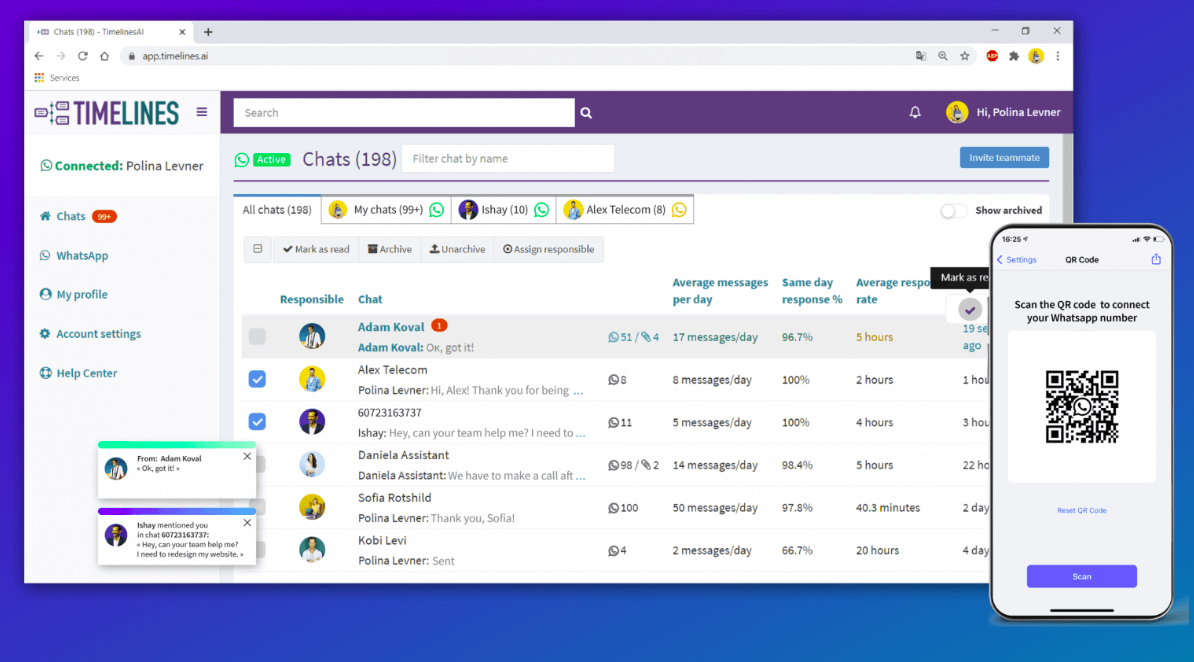
Scalability: Manage large teams and growing communication needs. TimelinesAI lets you handle over 100 WhatsApp numbers simultaneously.
Yes, this is how TimelinesAI goes above and beyond to ensure that your team has all the tools they need to work efficiently.
Conclusion
Automating workflows on Pipedrive offers a myriad of benefits for businesses seeking to streamline their sales processes. By using automation tools like TimelinesAI, teams can save time, boost productivity, and enhance customer engagement.
With the ability to set up seamless integrations and automate repetitive tasks, businesses can focus their efforts on nurturing leads, closing deals, and driving growth.
You can learn and explore more about our Pipedrive WhatsApp Integration by referring to our playbook here.
FAQs: Workflow automation with Pipedrive
1. How does automating workflows on Pipedrive with TimelinesAI benefit my business?
The automation saves time, improves productivity, and enhances communication within your sales process.
2. Is setting up automation with TimelinesAI difficult for Pipedrive users?
Setting up automation with TimelinesAI is generally considered easy as the platform has a clean and intuitive interface that simplifies the automation setup process. TimelinesAI provides comprehensive guides specifically tailored for Pipedrive users. These guides walk you through each step of creating automation, making it easy to follow along.
3. How does TimelinesAI ensure that automated messages maintain a personalized touch?
TimelinesAI personalizes messages using Pipedrive data. Include lead names in greetings, segment bulk messages based on demographics, and craft personalized content. Remember, high-quality Pipedrive data and a balance between automation and human interaction are crucial.


