

With their high engagement rates and asynchronous conversational nature, messaging apps are becoming increasingly popular for both personal and business communication. With over 3 billion users worldwide, WhatsApp is one of people’s favorite messaging platforms. Businesses are constantly looking for different ways to tap into WhatsApp’s potential and enhance all areas of business, including sales.
Sales is all about mastering the art of connecting with the right people at the right time. WhatsApp Business offers a unique set of features that can help you do that.
Before we talk about how WhatsApp can help you do that- here are some statistics to consider-
- A Kantar study revealed that 66% of online adults are more likely to purchase from a business reachable via messaging.
- A 2022 study commissioned by Meta found that 58% of marketers saw an increase in lead generation after starting business messaging.
- 64% of consumers are more likely to spend money if they can communicate with businesses on WhatsApp.
- When given a choice, 69% of respondents said they’d be more likely to buy from a brand offering WhatsApp interaction.
These statistics paint a clear picture of how WhatsApp can and should be used for Sales. In this blog, we will go through the top seven WhatsApp Business features that can take your sales game to the next level.
WhatsApp Business for Sales Teams
Imagine closing deals, providing customer support, and sharing product updates directly on a platform your clients already use and love. WhatsApp Business makes this possible.
Compared to the regular WhatsApp app, WhatsApp Business is exclusively tailored for business. It was launched in January 2018.
While both versions share core messaging functionalities, WhatsApp Business offers specific features designed to streamline communication for professional use, like business profiles, labels, automated messages, and product catalogs. Using these features, sales teams can personalize outreach, improve response times, and ultimately convert more leads into loyal customers.
Let’s start talking about the features that can help your sales team immensely.

Craft a Captivating Business Profile
First impressions matter, and your WhatsApp Business profile is your digital storefront. A well-crafted business profile builds trust and positions you as a credible business. It’s your chance to tell your story and start off on the right foot. Here’s how to create an impressive profile:
1. Add Basic Details
Start with the basics—your company name, a clear description of what you do, and your contact information. But remember, it’s important to nail the basics, so take your time to come up with a good business description.
2. Showcase Your Products
Use the product catalog feature to show your products or services. Add high-quality images of your products directly to your profile. This gives clients a sneak peek and entices them to inquire further.
3. Mention your Timings and Location
Customers prefer to deal with businesses that provide clarity. They don’t want to navigate endless channels to get your location information or wonder when you’re open.
So, make it easy for clients to know when and how to reach you. Clearly display your business hours so they know the best times to connect. You can even add your location if you have a physical shop.
4. Provide Social Media/Website Links
Expand your online presence by including links to your website and social media profiles on your e-business cards. This gives customers a chance to learn more about you and explore your offerings beyond WhatsApp.
These days, people like exploring a brand’s social media presence. The more they see and learn about you, the more informed their decisions become. Social media gives your brand a voice and a face, which enhances your credibility.

Pro Tips:
- Replace that blurry logo with a crisp, high-resolution image.
- Use a clear and concise description. This is not the place to take out your thesaurus. Do not go for fancy language and technical jargon.
- Focus on keywords that accurately convey the vision of your business. If rightly done, a few simple words can get the job done.
Investing time in your profile creates a professional first impression that sets the stage for successful sales conversations. Imagine a customer scrolling through WhatsApp, seeing your profile with stunning product images and a clear description – they’ll know instantly if you’re the perfect fit! That’s the power of a well-crafted profile.
Level Up Your Sales with WhatsApp Catalogs & Carts
Imagine turning your WhatsApp chats into a mini online store! With WhatsApp Business catalogs, you can do that. This nifty feature lets you showcase your products directly within WhatsApp, making it easier than ever for customers to browse, learn about, and buy your items.

1. Setting Up Your Shop Window
Getting started is simple. Include the following details in your catalog:
High-Quality Images: People love visuals. Add clear, attractive photos of your products from different angles. Invest in good photography as good visuals can and help your products stand out from the crowd.
Descriptive Details: Write clear descriptions that include prominent features, benefits, and any other relevant information you think a customer might need while purchasing. Remember, people do not buy products, they buy solutions. So, tell them how your products will make their lives easier or better.

Clear Pricing: Be upfront about your prices. This builds trust and avoids any confusion for your customers.
Also Read: How to Build and Optimize Your WhatsApp Business Catalogue in 2024?
2. Streamlining the Sale with Shopping Carts
Catalogs aren’t just for browsing. WhatsApp Business allows you to integrate shopping carts directly into your chats. This means customers can add products they like to a virtual cart and go for an easy checkout. The best part? They can do all this without shifting apps or switching to websites. They could be texting their friends one minute and shopping the next.

With in-chat shopping, people turn from leads into customers right on the app. They can browse your catalog, ask you questions, and make the purchase – all without ever leaving WhatsApp. Imagine the convenience! They can make quick and confident decisions, leading to a smoother and faster buying journey for everyone.
So, why wait? Start building a good Product Catalogue today.
Use Labels for Efficient Contact Management
Labels are like digital filing tags for your WhatsApp Business contacts. They help you categorize and organize your customers, making it easier to find the right person for the perfect message.

1. Organize Your Leads
Don’t let your customer contacts become a chaotic mess. WhatsApp Business allows you to assign labels to your contacts. You can use this feature to categorize and organize your contacts effectively. This can be based on demographics, purchase stage (interested, qualified lead, etc.), or any other relevant criteria. This way, you can find exactly who you need in seconds, not minutes.
2. Targeted Communication Made Easy
With labeled contacts, you can send targeted messages to specific groups of customers. This ensures your communication is relevant and personalized. Imagine sending a special offer to “high-value customers” or reminding “abandoned cart” contacts about the product they have left behind.
3. Boost Teamwork with Labels (Added Benefit)
Assign labels to leads based on industry, product interest, or any other relevant criteria. Team members can then find the perfect person for the job and ensure smooth handoffs throughout the sales cycle. Use labels to create a shared knowledge base of successful strategies and solutions so everyone on the team can learn from each other’s wins.
Use Automated Messages for Enhanced Engagement
Imagine your sales team being able to connect with customers 24/7, answer basic questions instantly, and even nudge them toward a purchase – all without lifting a finger. It’s not that far-fetched an idea as flying cars. Automated messages on WhatsApp Business makes this possible.
Here’s how you can use this feature to maintain instant and engaging communication with your customers:
1. Craft Automated Replies for Different Stages
Greeting Messages: Set up a warm welcome message to introduce your brand and set clear expectations for response times.

Here’s an example: “Hi there! Thanks for reaching out to [Your Business Name]. We’re excited to chat with you. A team member will be with you shortly, or you can browse our FAQ section for answers to common questions.”
Away Messages: If your team is swamped with work, don’t leave customers waiting. An “Away Message” will let them know that you’ll get back to them soon and offers options like visiting your website or leaving a message.

Quick Replies for Common Questions: Save time by creating pre-written responses to frequently asked questions about business hours, pricing, delivery, or product features. Customers will appreciate the immediate answers, and your team can focus on more complex conversations.
2. Personalize the Experience
People appreciate a conversation that feels like it’s meant for them. Use the information you have (like names) to personalize greetings and responses. For example, instead of a generic “Hi there,” use “Hi [Customer Name],”. It can make a big difference!
3. Calls to Action that Drive Results
Use compelling CTAs to nudge customers to take the next step in the buying journey. For example, you could tell them to visit a product page, download a brochure, or schedule a call.
TL;DR Automated messages ensure your customers never feel like they have been left on hold listening to elevator music.
Maximizing Sales with WhatsApp Business API
As we have seen, WhatsApp Business has become a game-changer for customer communication, and for good reasons. But what if you could take it a step further? That’s where the WhatsApp Business API comes in.
Here’s how the WhatsApp Business API can help you close more deals and streamline your sales process:
1. Automation and Scalability
The WhatsApp Business API allows you to automate routine and repetitive tasks using AI-powered chatbots. These chatbots can answer FAQs, schedule appointments, and even qualify leads based on pre-set criteria. This frees up your team’s time that they can instead use to build stronger relationships and close deals.

According to Hubspot, 60% of salespeople say AI/automation tools are an important part of their overall sales strategy. By automating repetitive tasks, your team can dedicate their energy to the human touch that keeps customers engaged and coming back for more.
2. CRM Integration
The WhatsApp Business API is the ultimate team player. It seamlessly integrates with several kinds of business tools, including popular CRM (Customer Relationship Management) tools.
This means all your customer interactions on WhatsApp—conversations, notes, and files—are stored in one central location. Your sales team has a complete view of each customer’s journey, which helps them personalize their approach and provide a more consistent buying experience.
Say a customer talks to your chatbot and inquires about a product. That information is automatically logged into your CRM. When a salesperson follows up, they can see the previous conversation and tailor their message accordingly.
3. Personalize at Scale
Customers today appreciate brands that go the extra mile to personalize their shopping experience. 62% of customers are more likely to ditch their loyalty to a brand if their experience feels impersonal. So, conversations that feel like they are tailored just for the customer can decide if they are coming back or going to your competitor.
However, it gets really difficult to personalize communication for a huge number of leads. The WhatsApp Business API can help you with this as it allows you to automate personalized messages at scale based on pre-defined criteria. You can segment your leads based on demographics, interests, or previous interactions and send targeted messages that resonate with each individual.
Instead of sending a generic blast message about a new product, you can send targeted messages based on a customer’s recent purchase history. This level of personalization shows that you care about their individual needs and preferences. This way, the customer feels like a valued customer and not just another number.
Pro Tip: You can use chatbots for automated lead qualification! They can ask questions to identify the lead’s needs and budget. Then, they can route qualified leads directly to your sales team. This saves you time and ensures your reps are talking to the most promising prospects.
By implementing these WhatsApp Business API features, you can empower your sales team to work smarter, not harder.
Close More Deals with Interactive Messages and Clear Calls to Action
Interactive messages and clear calls to action (CTAs) can help you turn window shoppers into paying customers. Here’s how they work:
1. Craft Interactive Messages
Think of your WhatsApp messages as mini conversations, not sales pitches. Here’s how to do that:
Text with Intent:
- Know your audience: Tailor your message based on the customer’s history. Did they inquire about a specific product? Mention its benefits directly. Remember, personalization is key.
- Keep it concise: People skim on mobile. Get straight to the point and highlight the value proposition.
- Ask questions: Engage the customer with questions related to their needs. This sets the stage for a natural transition to the CTA.
2. Add Clear CTAs
A strong CTA is like the closer in a sales team – it seals the deal. Here’s how to make them effective:
Action verbs: Use strong verbs like “Buy Now” or “Add to Cart.” Tell them exactly what to do next.
Urgency: Motivate immediate action with limited-time offers or mention low stock. Create a sense of “FOMO.”
Mobile-friendly: We live in a mobile-first world. Keep CTAs short and easy to tap on a smartphone screen.

The best way to find what works for you is to experiment. Consider A/B testing different versions of your messages and CTAs to see which options are working better. Analyze this data to see what’s working and what’s not. Are certain messages getting low engagement? Are your CTAs effective? Use these insights to identify areas for improvement and refine your strategies accordingly.
Generate Leads with Automated Flows
WhatsApp Business allows you to create automated chat flows. These pre-programmed conversation sequences can be incredibly useful for generating leads.
- Design a flow with a series of questions that will capture valuable lead information like contact details, areas of interest, and budget.
- When a potential customer initiates a chat, the flow will take over. It will take them through the conversation and collect valuable data.

Flows can handle inquiries any time of day, even if it’s 1 am on a Tuesday. That means you never miss a lead.
Now that we’ve covered a ton of ground on the WhatsApp Business features, let’s circle back to how you can jumpstart this whole operation
Getting Started with WhatsApp Business for Sales
WhatsApp Business has many tools in its arsenal that can enhance your sales strategy. So, without any further ado, here’s a breakdown of the initial steps to get you started:
Download and Set Up WhatsApp Business App: Download the “WhatsApp Business” app. For advanced features, consider the WhatsApp Business API.
Train Your Sales Team: Organise training sessions for your sales team so that they can utilize WhatsApp Business/API effectively. They can learn about:
- The best practices for communication on WhatsApp.
- Using features like product catalogs and labels for efficient sales communication.
- Data privacy regulations and how to handle customer information securely and responsibly.
Monitor and Analyze Performance: Track key metrics to measure the success of your WhatsApp Business integration. Some important metrics that you can track include:
- Response times: Monitor how quickly your team responds to inquiries.
- Conversion rates: Track how many leads convert into sales through WhatsApp.
- Customer satisfaction: Gauge customer sentiment through surveys or feedback.
Connect with Your CRM and Other Tools:
Integrate WhatsApp Business with your existing CRM (Customer Relationship Management) software or marketing automation tools. This ensures there is one single source of truth for all customer interactions.
If you’re thinking, ‘That sounds great, but sounds like a lot of work,’ don’t worry. Here’s where TimelinesAI can truly make a difference.
How TimelinesAI can help your Sales Business use WhatsApp Business Effectively
WhatsApp Business offers many useful features, but managing it effectively can be challenging, especially for larger sales teams. TimelinesAI steps in to bridge the gap.
Shared Inbox: With TimelinesAI, you can manage your WhatsApp Business for multiple numbers. It provides a shared inbox so your entire sales team can access, view, and respond to customer inquiries from a central location. No more confusion and duplicate messages!
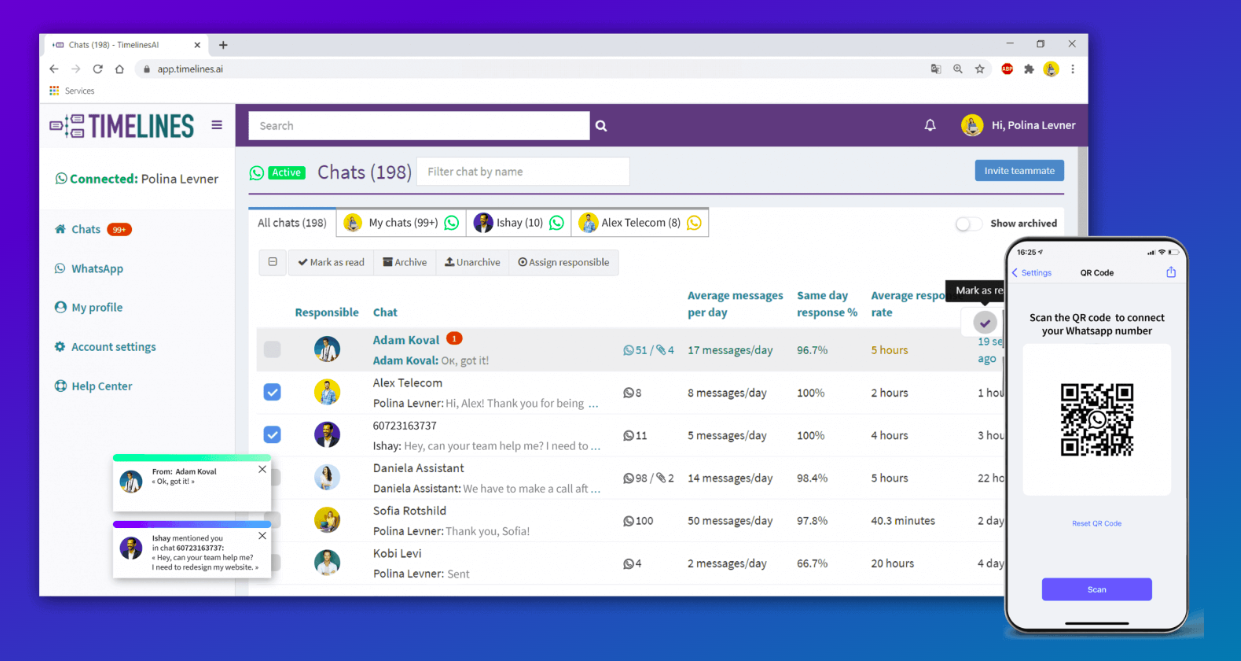
Team Collaboration: TimelinesAI allows for smooth collaboration within your team. You can assign chats to specific team members based on expertise or workload. You can use internal notes, filters, and group chats to share insights, discuss strategies, and brainstorm solutions. You can also set follow-up reminders so that no important task is missed.

CRM Integration: TimelinesAI integrates seamlessly with popular CRM systems like Hubspot, Salesforce, Pipedrive, and Zoho. This eliminates data silos and gives your team a complete 360-degree view of the customer journey.

AI-powered Automation: Don’t let basic inquiries slow down your team. Using TimelinesAI, you can use and deploy ChatGPT-integrated multilingual autoresponders for WhatsApp. These automated responses can handle greetings, answer frequently asked questions, and help your team qualify leads.
Also Read: Automate WhatsApp Replies in Multiple Languages with ChatGPT
Standardize Communication: You can ensure consistency in sales communication using TimelinesAI’s pre-defined message templates. Create templates for common inquiries, product descriptions, or special offers. This will save time, reduce errors, and ensure a professional brand image.

If TimelinesAI joins hands with WhatsApp Business, it can help your sales team to collaborate effectively, automate repetitive tasks, and ultimately secure more deals.
Conclusion
From creating a captivating business profile to streamlining communication with features like labels and automated messages, WhatsApp Business gives your team several tools to close more deals and provide exceptional customer service.
You can take your sales communication a step further using TimelinesAI. By offering features like a shared inbox, team collaboration tools, and CRM integration, TimelinesAI helps your sales team to use the full potential of WhatsApp Business and streamline your workflow. Get a free trial of TimelinesAI today and check it out for yourself!
Frequently Asked Questions (FAQs)
Q. Is WhatsApp Business free?
A. Yes, WhatsApp Business is free to download and use for its core features. There’s a paid option, WhatsApp Business Premium, for advanced features, but the core app is free.
Q. Is the WhatsApp Business catalog free?
A. Yes, creating and using WhatsApp Business catalogs is free. You can add products or services with descriptions and images to showcase your offerings directly within your WhatsApp Business profile.
Q. What is the difference between WhatsApp Business account and WhatsApp Business API?
A. WhatsApp Business account is a free app for small and medium businesses. It offers core features like creating a profile, product catalogs, and basic automation. On the other hand, WhatsApp Business API is a paid option for larger businesses with a high message volume. It provides advanced features like chatbots, CRM integration, and broadcast messaging.
Q. Is WhatsApp Business safe for communication with customers?
A. WhatsApp Business uses end-to-end encryption for messages, which means only the sender and recipient can access the content. However, it’s still important to maintain best practices for data security and customer privacy.


